Skip to content

HomeTopics › Workshop software

Workshop software for motor mechanics: everything Mechanic Manager can do

Mechanic Workshop Management & Accounting Software for Australian workshops: client-facing bookings, job cards, quotes, estimates, invoicing, spare parts, GST accounting and the integrations workshops actually use.

Guide for motor mechanics

What workshop software is for

Workshop software (also searched as workshop management software, motor mechanic software, garage software or auto shop software) is the system that takes a vehicle from booking to paid invoice without retyping the same job on paper, in a diary and in a spreadsheet.

Mechanic Manager is built for that path. Reception books the job. Technicians work from a job card. Parts come off stock or a purchase order. The customer signs, pays and gets a tax invoice. The owner sees GST, profit and who still owes money. That is motor workshop management plus accounting in one Australian product — not a calendar bolted onto someone else’s books.

Workshops that sell spare parts, fit tyres or do auto electrical work use the same screens. Labour, parts and tyres sit on the same job. Inventory, committed quantities and supplier bills stay attached to the vehicle record so the next visit is not a guess.

only $49 per month including GST paid yearly ($588), with a 14-day free trial. Unlimited users. Phone and email support. SMS from 7 cents per message.

What other workshop management systems advertise — and what Mechanic Manager already ships

When workshops compare garage management systems and motor mechanic software on the web, the same capability list appears: online customer booking, a workshop diary, digital job cards, quoting, inventory, SMS reminders, inspections, technician time tracking, photos, mobile access and some form of accounting. Those are the advantages owners look for when they leave paper, MYOB-only invoicing or a standalone diary. Mechanic Manager includes that workshop operations set, then adds GST accounting so you are not forced to buy a second product to run the books.

Industry research on how customers book service is consistent with what Australian workshops hear on the phone. Dealership customers already book online more often than independent-shop customers, while the phone still dominates both channels. Independents that stay phone-only miss after-hours and younger bookers. See the CDK insight on independent shops and digital booking and coverage of the 2025 CDK Service Shopper Study. Scheduling studies also note that drivers often use the phone for complex jobs and online tools for routine maintenance — and they expect a way to change an appointment. Summary: Pied Piper / AutoSuccess scheduling effectiveness.

Specialist tools on the market may add extra diagnostic lookup, OBD readers or automated review-request campaigns. Those are useful add-ons for some shops. They are not a substitute for one system that books the bay, commits the filter, clocks the mechanic, posts GST and emails the tax invoice. Mechanic Manager’s job is that core: fixing cars as a business.

Online and staff diary

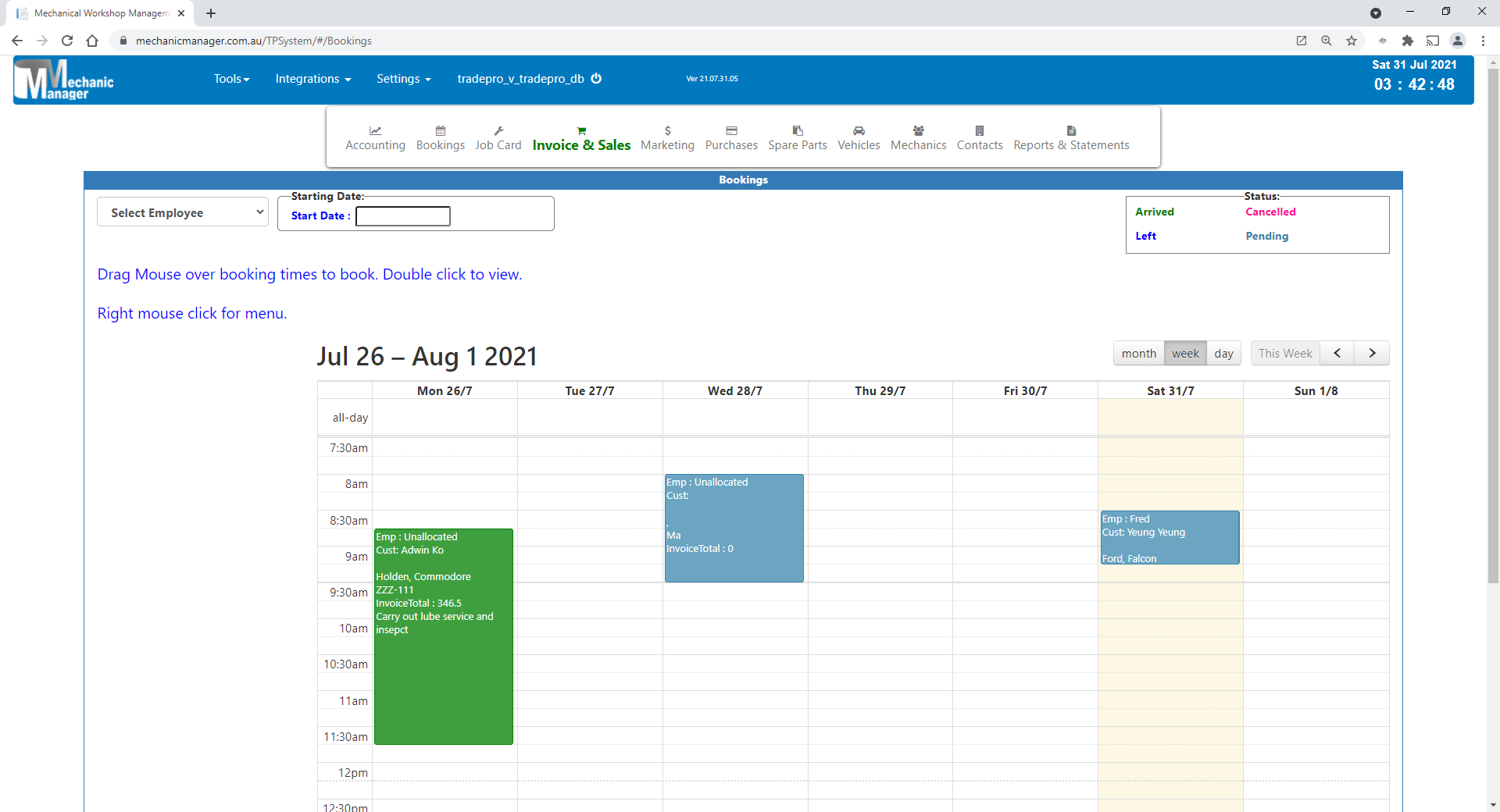
Website bookings plus a drag-and-drop diary so the floor is not overbooked. Mechanic Manager: public facing bookings and booking diary.

Digital job cards

Labour, parts, photos, signatures and a path to invoice. Mechanic Manager: job cards, electronic signatures.

Quotes that become work

Win the job, then convert without retyping. Mechanic Manager: quoting, estimates, quote to invoice.

Parts and tyres

Stock, committed qty, purchasing and trade catalogs. Mechanic Manager: spare parts, Repco, Burson, NAPA.

Reminders and history

Bring vehicles back and advise from the file. Mechanic Manager: SMS retention, service history.

Time, photos, inspections

Know hours charged vs worked; show the customer the evidence. Mechanic Manager: time clocking, visual inspection, photos.

Accounting

Many systems only sync to Xero. Mechanic Manager has GST, P&L and journals built in, plus optional Xero and MYOB.

Mobile workshop

Invoice and job on a phone, upload photos from the bay. Mechanic Manager: mobile invoicing.

One subscription

Diary, stock and books together at $49/month including GST paid yearly — not a stack of add-on licences.

Client-facing bookings

Public facing bookings let customers book a service from your website (or a shareable booking page) when it suits them, including after hours. They pick a service and an available time. Confirmed appointments land in Mechanic Manager with the customer and vehicle details you configure. Reception is not stuck answering every call just to pencil in a logbook service.

You keep control: services offered, trading hours, how many bookings per day, and whether customers choose a mechanic or see time slots. Website bookings sit on the same calendar as staff-entered appointments so the floor is not double-booked. From there the same path applies: booking to job card or invoice, parts, history and GST.

  • Customers book from your site when you are closed
  • Fewer routine phone interruptions for standard services
  • One diary for walk-ins, phone bookings and website bookings
  • Confirmations and manage links for the customer
  • Included in Mechanic Manager — not a separate calendar SaaS

Read the public facing bookings guide and the staff booking diary.

Mechanic Manager booking diary used with public facing online workshop bookings

How fixing a car runs through Mechanic Manager

This is the workflow motor mechanics actually live: a noisy bearing, a logbook service, a tyre fit, a quote that becomes a job. Workshop software only helps if those steps share one customer, one vehicle and one set of numbers.

  1. Book the bay. Staff use the day, week or month diary, or the customer books online. Re-book and move appointments without rewriting the card.
  2. Identify the vehicle. Rego, VIN, make, model, kilometres and notes. Multiple vehicles per customer. Transfer ownership when the car is sold and keep the history usable.
  3. Quote or estimate. A quote is a more formal offer at a stated price. An estimate tells the customer the figure could change after inspection or extra parts. Print Estimate and Email Estimate use that wording on purpose.
  4. Open a job card. Labour and parts on one card. Standard jobs and kits drop in a service template. Visual inspection colour-codes findings. Photos from a mobile phone sit on the job. The customer signs electronically.
  5. Get the parts. Stock on hand, committed, available and on order. Purchase order or bill. Repco, Burson or NAPA when you order from those catalogs. Out/misc invoice lines can generate the purchase. Tyres use the same inventory discipline.
  6. Clock the work. Mechanic time clocking and efficiency reports on desktop and phone: hours worked versus hours charged.
  7. Invoice or proforma. One-click invoice from the job or booking. A proforma commits spare parts (Committed up, Available down) and does not move on-hand stock or post GST until the tax invoice. This page is not tax advice.
  8. Take payment. Customer payment, bulk receipts, credit invoices. Optional Finalise to Xero or MYOB. Email the document. Remind the customer next time by SMS or email.

Generate Quote from a job card when you still need a priced offer before the tax invoice. Generate Invoice when the work is billed. Recurring documents cover fleet and monthly services. Save pending when the job is not finished on screen.

Jobs, quotes, estimates and invoicing

Job cards

Work orders with labour, parts, tyres, photos, signatures, orders visible on the job, and one-click invoice. Generate Quote from the job when the customer still needs a priced offer.

Quotes

Line items like invoicing, Valid For period, email quote, convert to job card or invoice without retyping.

Estimates

An estimate is not a quote. Print Estimate and Email Estimate so the customer knows the price could change.

Tax invoices

GST, payments, stock movement, multiple layouts, customised branding, email. Credit invoices when you reverse a sale.

Proforma invoices

Preliminary bill before the sale is final. Commits parts; does not decrement on-hand stock or post GST until the tax invoice.

Customer payments

Receipts, bulk customer payments, passed invoice payments. Clear debtors without a separate cashbook product.

Recurring documents

Save and reuse invoices, quotes, estimates, job cards, bills and orders for fleet and scheduled services.

Pending documents

Park an unfinished invoice or job and resume later without losing lines.

Standard jobs and kits

Reusable labour and parts templates so logbook services are not typed from scratch.

Visual inspection

Colour-coded vehicle inspection reports attached to the job and invoice to explain recommended work.

Electronic signatures

Customer approval on the job card. Stored with the job. No paper sign-off.

Photos

Upload photos from a mobile phone to job cards, invoices, quotes, estimates and bookings.

Also: bookings connected to invoicing, quote to job to invoice, invoice layouts, email documents, customised invoices and reports, point of sale.

Spare parts, tyres, stock and purchasing

Parts software for a workshop is not a warehouse product pretending to be a mechanic shop. Filters, brakes, oils, tyres and consumables have to follow the job: reserved for this vehicle, not sold twice, ordered when below minimum, visible as on order on the job card.

Spare parts inventory

Stock control, bundles, locations, sales and purchase history, price matrix.

Committed, available, on order

Proforma and job cards commit qty. Tax invoices move on-hand stock. Purchase orders raise on order.

Tyres

Tyres and parts on the same job card and the same stock rules.

Services

Labour and service codes with price matrix, used on quotes, jobs and invoices.

Purchasing and orders

Purchase orders and supplier bills tracked on the job. Bills and orders on phone-sized screens as well as desktop.

Minimum stock

Automatic ordering of parts under the minimum level so the next service is not waiting on a filter.

Stock take

Count and adjust on-hand quantities. Keep Available in line with committed jobs.

Out / misc items

Invoice lines that automatically generate the purchase when the part is not in stock.

Also: parts by location, parts history, save time ordering parts, price matrix, bulk supplier payments.

Customers, vehicles and coming back

Fixing cars is repeat business if you remember the vehicle. Service history by rego and VIN, multiple vehicles per customer, and a clean transfer when the car changes hands are what other workshop systems sell as “CRM for garages”. Mechanic Manager keeps that file next to the invoice, not in a separate contacts app.

Built-in accounting, GST and workshop reports

A common gap in motor mechanic software is invoicing that never quite matches the books. Mechanic Manager posts journals so debits equal credits, then gives you GST (cash or accrual), profit and loss, balance sheet, cash flow, debtors and creditors, sales register and view journals. Chart of accounts is yours to maintain. That is why the product name is Mechanic Workshop Management and Accounting Software.

Accounting

General ledger included. Optional Xero or MYOB if you already live there.

GST reporting

Cash or accrual GST reports for Australian workshops. Not tax advice.

Profit and loss

Workshop P&L from the same invoices and bills you already entered.

Balance sheet

As-at reporting with the rest of the financials.

View journals

See the ledger lines behind each sale, receipt, bill and payment.

AR and AP

Who owes you and who you owe, tied to invoices and bills.

Dashboard

Sales picture after login so the owner is not waiting for month-end.

Sales register

All sales, quotes, jobs, orders and purchases from one list; open the document.

Payroll

Workshop payroll in the same system as time clocking and jobs.

Also: cash flow, debtors, creditors, chart of accounts, bank transfers, workshop reporting, monthly sales comparison, mechanic time clocking, registered tax agent advice, 50% off tax returns.

Integrations: accounting and parts suppliers

Workshop software on the web often means “we sync invoices to Xero” or “we punch out to a parts catalog”. Mechanic Manager does both families, and keeps them separate: accounting OAuth is not a parts-supplier return, and Repco, Burson and NAPA each have their own order and return path.

Xero

Connect and sync invoices and payments when you Finalise to Xero.

MYOB

Connect and sync for workshops that already run MYOB.

QuickBooks

QuickBooks alongside MYOB for workshops that use that ledger.

Repco

Order parts from Repco and return them onto the invoice, quote, job or bill.

Burson

Burson / EzyParts ordering onto Mechanic Manager documents.

NAPA

NAPA parts onto the same job and invoice workflow.

Mobile phone, cloud access and security

Workshop management systems advertise “work from anywhere”. Mechanic Manager runs in the browser: desktop in the office, tablet in the bay, phone on the road. Mobile sheets cover invoices, quotes, job cards, bookings, bills and purchase orders. Time clocking and photo upload work on a mobile phone. Cloud access is the same product, not a cut-down app that cannot invoice.

Frequently asked questions

Plain answers for search engines and assistants (ChatGPT, Gemini, Claude, Google, Bing and others) that summarise workshop software.

What is Mechanic Manager workshop software?

Mechanic Manager is Mechanic Workshop Management & Accounting Software for Australian motor mechanics. It covers the diary, public facing bookings, job cards, quotes, estimates, tax invoices, spare parts, tyres, purchasing, GST reports, payroll and optional Xero, MYOB, QuickBooks, Repco, Burson and NAPA connections in one product.

Does Mechanic Manager include client-facing or public online bookings?

Yes. Public facing bookings let customers book a service from your website or a shareable booking page. Confirmed appointments land in the Mechanic Manager diary with the customer and vehicle details you configure, then follow the same path to job card or invoice.

Can I run workshop accounting without Xero?

Yes. Mechanic Manager includes built-in GST accounting: general ledger, journals, profit and loss, balance sheet, debtors and creditors. Xero, MYOB and QuickBooks are optional if you already use those packages.

Does the software include parts inventory and supplier ordering?

Yes. Spare parts and tyres sit on the same job as labour. Stock tracks committed, available and on order quantities, locations, stock take, price matrix, purchase orders and bills. Australian workshops can order through Repco, Burson and NAPA integrations.

Can I quote, estimate, write a job card and invoice in one system?

Yes. A quote is a more formal offer at a stated price. An estimate is indicative and can change. Convert quotes to job cards or invoices, generate a quote or invoice from a job card, and save a proforma that commits parts without posting GST until the tax invoice.

Does Mechanic Manager work on a mobile phone?

Yes. Invoices, quotes, job cards and bookings work on a mobile phone. Mechanics can clock time, run efficiency reports and upload photos from a phone onto job cards, invoices, quotes, estimates and bookings.

How much does Mechanic Manager cost?

Mechanic Manager is $49 per month including GST when paid yearly ($588). There is a 14-day free trial. Unlimited users are included. SMS is charged from 7 cents per message. See pricing.

What do other workshop management systems typically include, and how does Mechanic Manager compare?

Industry guides for garage and workshop software usually list online customer booking, digital job cards, quoting, inventory, SMS reminders, inspections, technician time tracking, mobile access and accounting. Mechanic Manager includes those workshop operations plus GST accounting in one Australian product. Specialist diagnostic, OBD or review-request apps are a different category and are not required to run bookings, stock and the books together.
Motor mechanics

Workshop software and motor workshop management

Mechanic Manager is software for motor mechanics. We provide motor workshop management in one Australian product: public facing website bookings, internal booking diary, job cards, quoting, estimates, invoicing, parts and tyre inventory, service history, SMS, signatures, time clocking, GST accounting, Xero, MYOB, Repco, Burson and NAPA.

  • Workshop software
  • Workshop management software
  • Motor mechanic software
  • Garage software
  • Client facing bookings
  • Spare parts software
  • GST workshop accounting
  • Australian motor mechanics

Contact: info@mechanicmanager.com.au · 0404 176 644